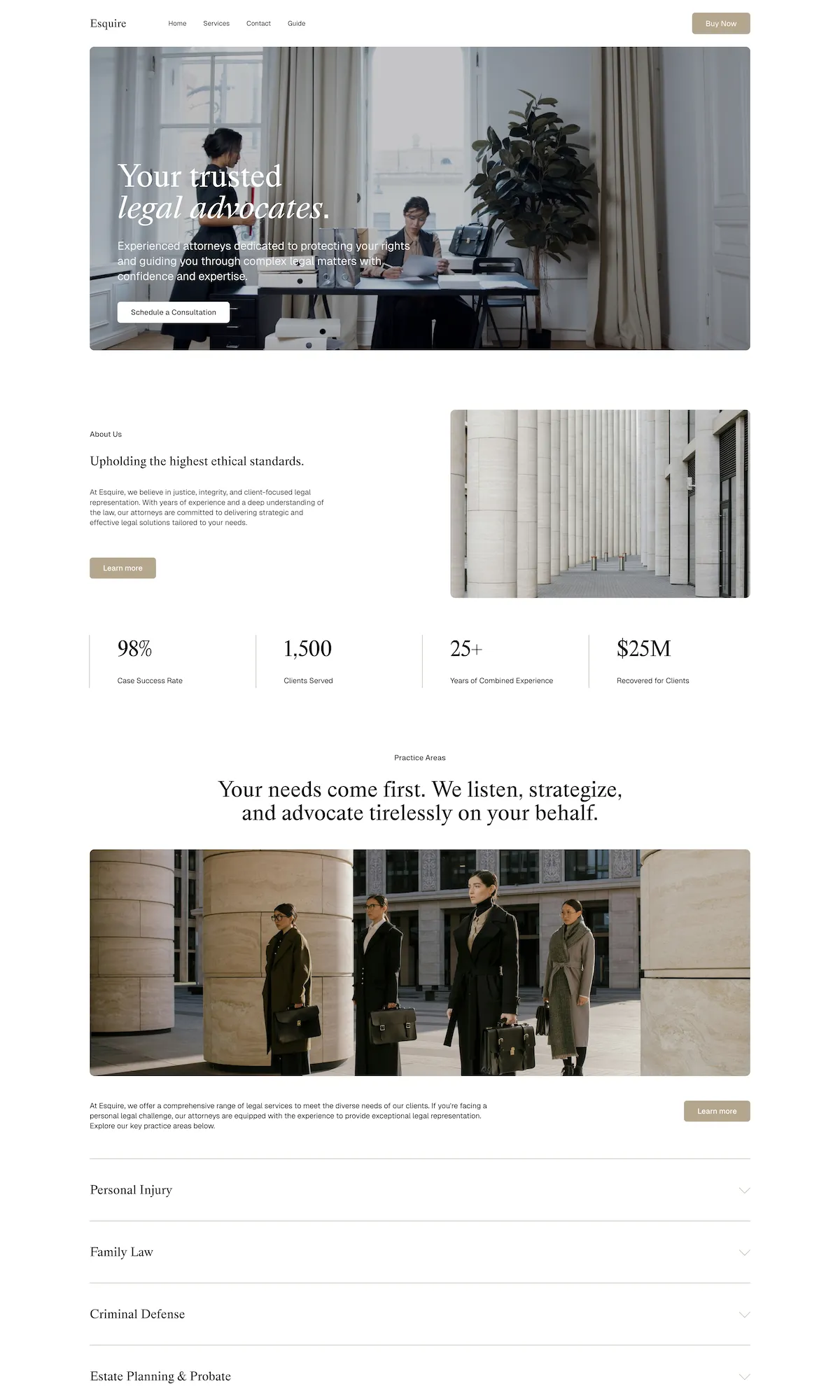
For a law firm, your website is often the first impression a potential client ever gets. Long before someone picks up the phone, they search, they read, and they decide in seconds whether your firm looks credible. A polished, easy-to-navigate site is not a nice-to-have. It is the front door to your practice.
The good news: you do not need a five-figure agency build or a developer on retainer to get there. Squarespace law firm websites give solo attorneys and multi-partner firms alike a professional, mobile-ready presence they can launch and maintain themselves. This guide covers why Squarespace works so well for legal practices, the pages every firm needs, the design choices that earn a client's trust, and the fastest ways to get online.
Why Squarespace works for law firms
Law firms have specific needs: credibility, clarity, and an easy path from "I have a legal problem" to "I have booked a consultation." Squarespace covers them without the cost and complexity of a custom build:
- Professional templates out of the box. Clean, corporate layouts that look established from day one, with no design skills required.
- No code, ever. Edit practice areas, update attorney bios, and post firm news right from the Squarespace editor.
- Fast and mobile-ready. More than half of legal searches happen on a phone, and Squarespace sites reflow automatically for every screen.
- Built-in SEO. Editable page titles, meta descriptions, and clean URLs on every page help your practice-area pages get found.
- Secure and hosted. SSL, hosting, and updates are handled for you, so it is one less thing for a busy firm to manage.
- Affordable and predictable. A fraction of a custom agency site, with no surprise maintenance invoices.
The pages every law firm website needs
A great law firm website is not about flash. It is about answering a prospective client's questions and making it obvious how to reach you. These are the pages that do the work:
Practice areas
A dedicated page for each area you practice: family law, personal injury, estate planning, business law. These pages are also your best SEO asset. Someone searching "estate planning attorney [your city]" should land on a page built for exactly that.
Attorney bios
Clients hire people, not logos. Give each attorney a real bio: background, bar admissions, notable results, and a photo. Credibility signals like memberships and awards belong here too.
Consultation and contact
Make the next step effortless. A clear contact form, phone number, and (where appropriate) a "book a consultation" call-to-action on every page turn a visitor into a lead before they leave.
Results and testimonials
Within the bounds of your bar's advertising rules, case results and client testimonials are powerful trust-builders. A short "what to expect" section reassures nervous first-time clients.
About the firm
Your story, your values, and why clients choose you. This is where a solo practice or boutique firm can stand apart from the big directory listings.
Design that earns a client's trust
Legal clients are often stressed and skeptical. The design job is to signal competence and put them at ease:
- Keep it clean and professional. Generous spacing, a restrained color palette, and readable type read as "serious firm."
- Make it fast. A slow site costs you clients before they read a word. The hidden costs of a slow website add up quickly for a firm.
- Design for mobile first. Tap-friendly buttons and click-to-call numbers matter when someone is searching from their phone.
- Guide the eye to one action. Every page should make the next step (call, email, or book) obvious.
The fastest way to launch: the Esquire template
If you want a professional site live quickly, start from a template built for the job. Esquire is our law firm Squarespace template, with practice-area pages, an attorney directory, and consultation-ready contact forms already structured for you. It is built on Squarespace 7.1, fully responsive, and needs no code or plugins. You edit the copy, swap the photos, and you are live, with a one-time purchase and no monthly fees.
Browse the rest of our Squarespace templates if you want to compare styles before you commit.
Prefer it done for you?
Short on time? Our custom website service builds a polished Squarespace site for your firm, designed, built, and ready to launch, typically within a week. You bring the content and the expertise, and we handle the design and the build.
Getting found: SEO basics for law firms
A beautiful site nobody finds will not book consultations. A few fundamentals go a long way for a firm:
- One page per practice area, each targeting how clients actually search ("DUI lawyer [city]", not "criminal defense services").
- Claim your Google Business Profile and keep your name, address, and phone consistent everywhere.
- Write real, helpful content. FAQs and short guides answer client questions and win long-tail searches.
For a deeper walkthrough, see our step-by-step guide to improving your website's SEO on Squarespace.
Ready to build your firm's website?
A modern Squarespace law firm website is well within reach, whether you start from the Esquire template and launch it yourself, or have us build it for you. Either way, your firm gets a site that looks the part and turns searches into signed clients.
Last updated
February 13, 2023
Category
Insight

